Start with one record and one accountable decision
A human-controlled AI workflow lets software propose an output while a named person decides whether it can become an accepted record or trigger an action. A review button alone does not provide that control. The reviewer needs evidence, editing rights, and a clear understanding of what acceptance changes.
Kings Landing's BauBau Construction Diary work provides a concrete example. The documented workflow starts with photos and site context. AI proposes a structured draft. A person reviews, corrects, and submits it. Authorized review and approval follow, with reporting and agents working from confirmed information.
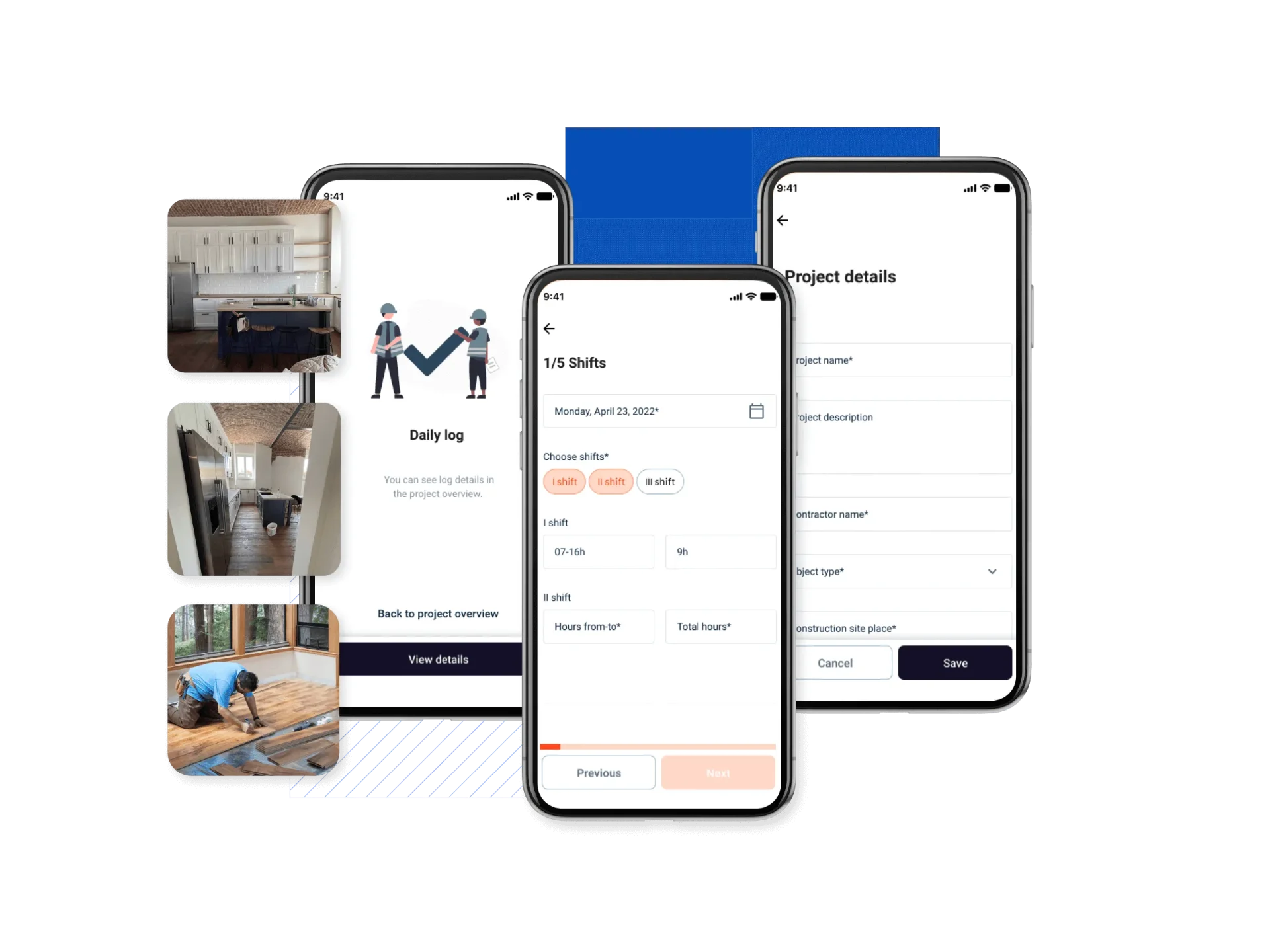
The product screens above show daily-log, shift-entry, and project-details interfaces. They are product evidence, not screenshots of every AI review state described here. The steps below are design recommendations drawn from the case study, not a claim that every suggested feature has shipped in BauBau.
1. Define the AI task and its boundary
Choose one job before choosing an interface. Is AI drafting a site entry, extracting fields from evidence, or suggesting the next action? Write down the inputs, permitted output, and consequence of an incorrect result.
For a construction diary, a useful boundary is a proposed entry that remains editable. Generating that draft must not also approve it, overwrite a confirmed record, or send it to an external recipient.
Ask which parts of the task are ordinary rules rather than inference. Required fields and role permissions should not depend on whether a model happens to follow an instruction. For wider product decisions, start with AI product discovery and design, not a chatbot screen.
2. Design the states before designing the screens
Make each state answer a practical question. Where is the record saved? Has AI changed it? Has anyone checked it? Can another person rely on it?
BauBau's documented design separates local drafts, queued media, synchronization, submission, and approval. That distinction matters when a construction team works with incomplete uploads or an unreliable connection. A saved local draft is not the same thing as a submitted record.
Use a state map like this as a starting point, then adapt its owners to the real team.
| State | What it means | Who moves it forward |
|---|---|---|
| Local draft | Captured information may still need upload or synchronization. | The contributor, with visible sync status. |
| AI draft | Generated content is a proposal, not a confirmed account. | The person assigned to review it. |
| Reviewed | A person has checked the proposal and corrected errors. | The contributor or designated reviewer. |
| Submitted | The record has entered the agreed review process. | An authorized approver. |
| Approved | The organization has accepted this version of the record. | Only a permitted amendment process. |
Do not merge these states into a green success message. Show the current state in words and name the next required action.
3. Put evidence beside the proposal
The reviewer should be able to inspect the source without reconstructing the whole task. Show the relevant photo, note, or document beside the proposed field. Separate supplied information from model-generated interpretation.
For example, if an AI draft describes completed work, let the reviewer inspect the supporting photo and edit that description in the same context. If evidence is missing, say so. A fluent sentence is not a substitute for a source.
BauBau's case study connects photos, versions, reviews, and amendments to the exact record. Use that as a design principle for traceability. Avoid a detached activity feed that makes people guess which version was approved.
4. Make correction easier than starting again
Provide direct editing for a small error, rejection for an unusable proposal, and regeneration when the inputs have genuinely changed. Those are different actions with different consequences.
Regeneration should not silently erase a person's corrections. Before replacing edited content, explain what will change and keep a way back to the earlier version. Where two people can edit, define how the product handles a conflict rather than letting the last save silently win.
Ask users to correct a deliberately wrong field during a prototype session. Watch whether they can find the evidence, make the correction, and explain what the next button does. Testing a perfect AI response tells you little about this part of the workflow.
5. Assign permissions to roles, not prompts
List who can create, review, submit, approve, amend, and export each record. Decide whether a reviewer can approve their own work. Resolve that with the organization rather than treating one policy as universal.
BauBau's documented approach uses role-bounded visibility and puts human confirmation between AI proposals and accepted information. Apply the same boundary to an agent that reads or acts on records. It should receive only the information and actions its role permits.
The interface can explain permissions, but it cannot enforce them alone. Include permission checks in the technical requirements. Do not describe a draft as approved simply because an agent has read it.
6. Design failure and recovery as part of the workflow
Write the failure path beside the successful path. What happens when generation times out, a source upload fails, or an authorized reviewer is unavailable?
For an upload failure, show whether the file is stored locally, queued, or received by the server. For a generation failure, preserve the person's input and offer a manual path. After a retry, tell the user whether the action completed once or could have created a duplicate.
Treat unsupported conclusions differently from technical errors. A model can return a valid-looking answer that the evidence does not support. The reviewer needs a way to reject that answer without losing the original material.
For actions outside the product, such as sending a report, design a separate confirmation of the recipient and content. Reviewing text and authorizing delivery are not the same decision.
7. Test control, not just task completion
A fast completion can still be a failed workflow if someone approves incorrect content without noticing it. Define the test conditions before setting a performance target.
Use realistic examples, including an incorrect draft, missing evidence, a permission boundary, and a recovery path. Observe whether participants understand the status, detect the planted error, and retain their corrections after a retry.
Record review time, corrections, mistaken approvals, and abandoned attempts where those measures fit the task. Compare them with the current non-AI workflow. Do not claim time savings or greater accuracy until the evidence supports that claim. Kings Landing's public BauBau case study documents design decisions, not a quantified performance result.
Your pre-build checklist
Before committing to the build, the team should be able to answer each of these questions.
- What may AI propose, and what must it never do automatically?
- Which evidence lets a person check each important field?
- How are local, generated, submitted, and approved records distinguished?
- Who can review, approve, and amend a record?
- Can people edit, reject, or retry without losing their own work?
- What remains available when uploads, generation, or synchronization fail?
- Which prototype tests would reveal a mistaken approval?
If the answers are unclear, the next step is workflow definition and testing. Platform product design provides the wider context for connecting roles, records, and actions. The contact action above starts a discussion about that design work.
Sources and further reading
Kings Landing's BauBau Construction Diary case study is the source for the project-specific workflow, state distinctions, traceability, and role boundaries described here.
Google's People + AI Guidebook provides human-centered AI design guidance on autonomy, risk, context, and feedback. Microsoft's Guidelines for Human-AI Interaction, published at CHI in 2019, provides a research foundation for designing and evaluating human-AI interaction. The checklist and examples in this article are Kings Landing's synthesis, not quotations from either source.
Apply it to a content website
For a Ploy content website, our connected Ploy websites service explains the implementation scope. Our tested CMS publishing example separates editorial access from the public website's read-only access and checks the draft-to-live release. It is website publishing evidence, not proof of an AI decision workflow.